

relation public.profiles does not exist - Supabase Error Fix
Fix the 'Database error saving new user', 'relation public.profiles does not exist' and 'Failed to invite user' errors in Supabase. Complete step-by-step guide for auth and PostgreSQL profile table issues.
Troubleshooting the "Database error saving new user" in Supabase
Discover how to troubleshoot the 'Database error saving new user', 'Failed to invite user: failed to make invite request: Database error saving new user' or 'relation public.profiles does not exist supabase' error in Supabase. Our step-by-step guide helps you pinpoint the issue, review SQL code, and resolve conflicts. Perfect for developers looking to overcome this common challenge.
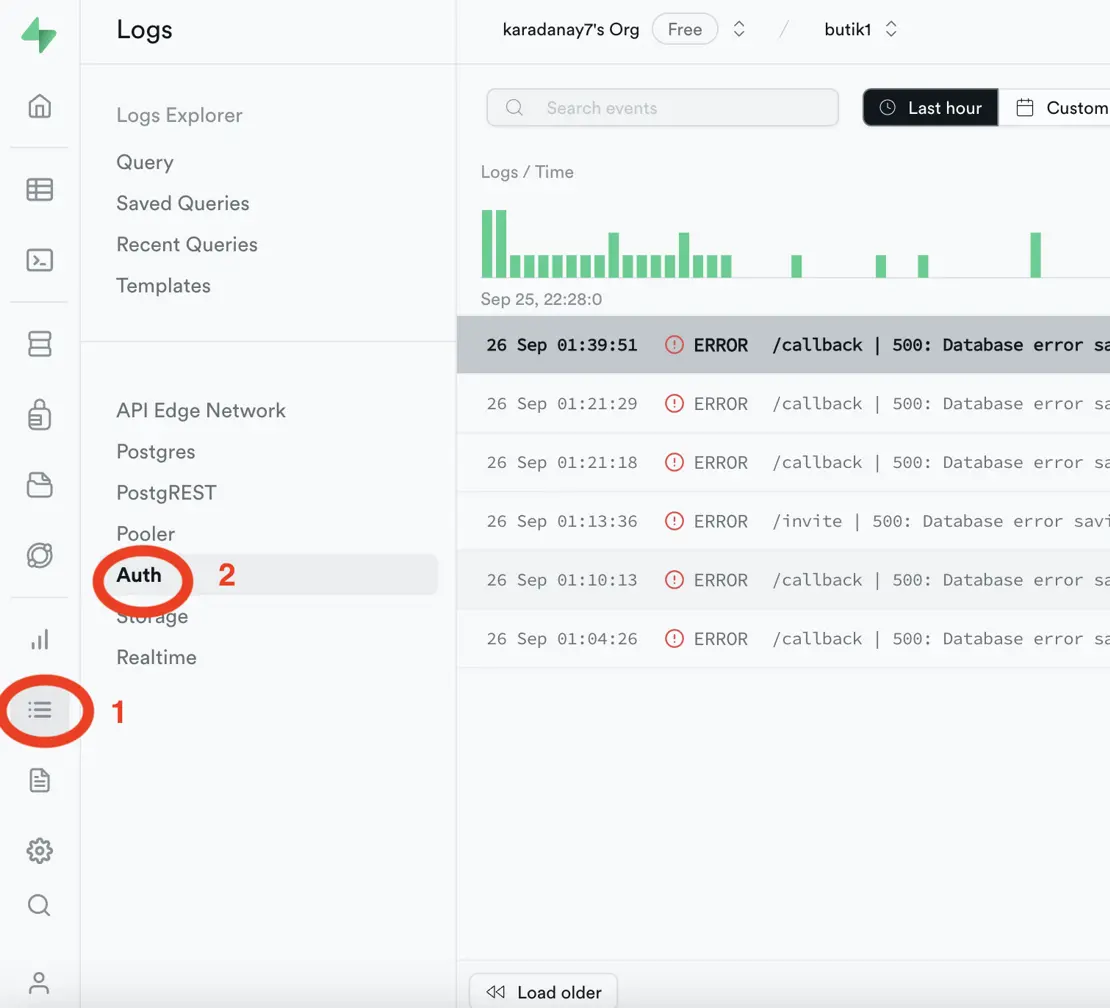
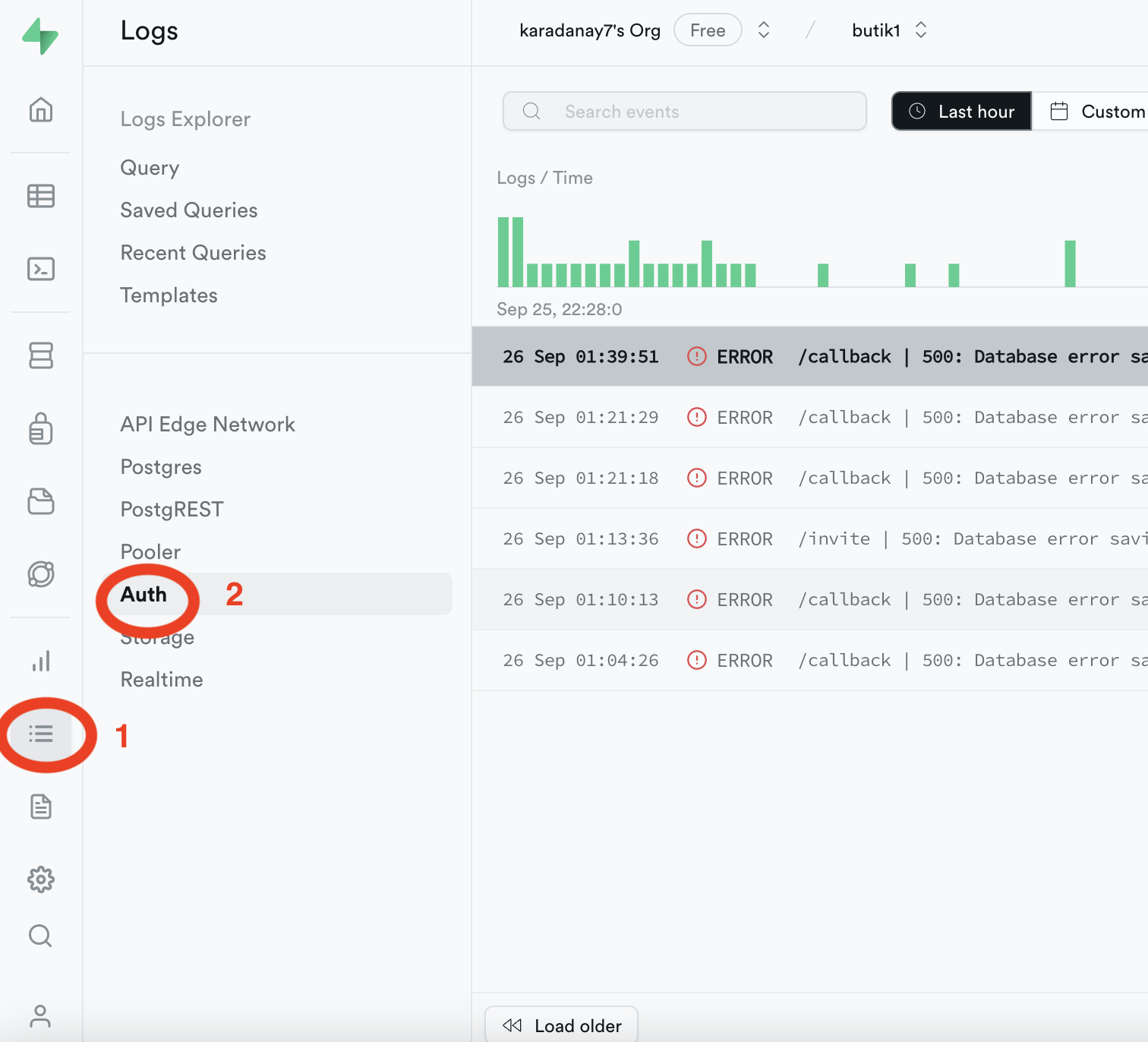
Step 1: Review Supabase Logs
To identify the cause of the error in Supabase, follow these steps:
- Log in to your Supabase account.
- Access the "Logs" section.
- Click on the "Auth" category.
- In the "Auth" logs, filter by "severity."
- Look for the error message related to the missing relation.
This step will help you pinpoint the specific error message and its context.
Common Error Message:
Error: 'relation public.profiles does not exist'
Step 2: Examine SQL Editor
Inspect your SQL code in the Supabase SQL editor to ensure your User Manager Starter code or any related queries for creating the "profiles" table are correct:
- Open the SQL editor in Supabase.
- Execute the SQL code responsible for creating the "profiles" table.
- Check for any warnings or errors.
If there are issues in your SQL code, this step will help you identify and address them.
Step 3: Delete Problematic Functions
In certain cases, functions or triggers might conflict with your database setup. If you've identified issues related to functions like handle_new_user or create trigger on_auth_user_created, consider deleting them:
Original Function and Trigger:
create function public.handle_new_user()
returns trigger as $$
begin
  insert into public.profiles (id, full_name, avatar_url)
  values (new.id, new.raw_user_meta_data->>'full_name', new.raw_user_meta_data->>'avatar_url');
  return new;
end;
$$ language plpgsql security definer;

create trigger on_auth_user_created
  after insert on auth.users
  for each row execute procedure public.handle_new_user();
Solution: Drop the Function and Trigger
Run these queries to remove the conflicting function and trigger:
Drop the Function:
DROP FUNCTION IF EXISTS public.handle_new_user();
Drop the Trigger:
DROP TRIGGER IF EXISTS on_auth_user_created ON auth.users;
By removing conflicting functions and triggers, you can resolve potential conflicts and retest your database setup.
Step 4: Recreate the Profiles Table (If Needed)
If the profiles table doesn't exist, create it with the correct schema:
CREATE TABLE public.profiles (
  id UUID REFERENCES auth.users ON DELETE CASCADE,
  full_name TEXT,
  avatar_url TEXT,
  created_at TIMESTAMP WITH TIME ZONE DEFAULT NOW(),
  updated_at TIMESTAMP WITH TIME ZONE DEFAULT NOW(),
  PRIMARY KEY (id)
);

-- Enable Row Level Security
ALTER TABLE public.profiles ENABLE ROW LEVEL SECURITY;

-- Create policies
CREATE POLICY "Public profiles are viewable by everyone."
  ON public.profiles FOR SELECT
  USING (true);

CREATE POLICY "Users can insert their own profile."
  ON public.profiles FOR INSERT
  WITH CHECK (auth.uid() = id);

CREATE POLICY "Users can update own profile."
  ON public.profiles FOR UPDATE
  USING (auth.uid() = id);
Step 5: Test User Creation
After completing the above steps:
- Try creating a new user through Supabase Auth
- Check if the profile is automatically created
- Verify that invite links are sent successfully
Result
After all these steps, I was able to:
✅ Create new users successfully
✅ Send invite links without errors
✅ Properly manage user profiles in Supabase
Key Takeaways
- ✅ Always check Supabase logs for detailed error messages
- ✅ Review SQL functions and triggers for conflicts
- ✅ Drop and recreate problematic functions when necessary
- ✅ Ensure the profiles table exists with correct schema
- ✅ Test thoroughly after making changes
Common Causes of This Error
- Missing
public.profilestable - Incorrect function or trigger syntax
- Conflicting triggers on
auth.users - Schema migration issues
- Incorrect Row Level Security (RLS) policies
Related Errors
This guide also helps with:
Database error saving new userFailed to invite user: failed to make invite requestrelation "public.profiles" does not existfunction public.handle_new_user() does not exist
I hope this post will be helpful to you too.
Happy coding! 🚀
Additional Resources
Have you encountered similar Supabase errors? Share your experience in the comments below! 💬